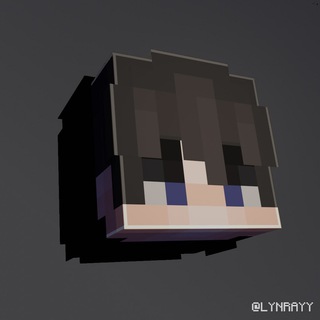
About this App
How HeadMC Transforms Minecraft Skins into Avatars
Ever wanted to use your Minecraft character as a profile picture outside the game? HeadMC does exactly that—it takes any Minecraft skin and converts it into a clean, high-quality avatar. The process is straightforward: upload your skin file or provide a username, and the bot generates a cropped, polished version of your character's head.
What makes it stand out is the attention to detail. Unlike basic skin renderers, this tool adjusts lighting, removes background noise, and sharpens facial features. The result looks natural, not like a pixelated screenshot. Whether you're using Steve's default face or a custom-designed skin, the output retains the original colors and textures while making it suitable for social media or messaging apps.
One underrated feature is the batch processing option. If you manage a Minecraft server or community, you can generate multiple avatars at once—perfect for creating uniform profile pics for your team. The bot supports both the classic 64x64 and HD 128x128 skin formats, so even intricate designs translate well.
Behind the Scenes: How the Bot Processes Your Skin
HeadMC isn’t just a simple crop tool. Here’s what happens when you submit a request:
🔹 Skin validation: The bot checks if the file or username corresponds to a valid Minecraft skin, filtering out broken or private profiles.
🔹 Layer merging: It combines the base skin layer with accessories (like hats or glasses) for a complete look.
🔹 Perspective adjustment: The head is rendered at a slight angle (about 30 degrees), giving depth compared to flat front-view extracts.
🔹 Anti-aliasing: Jagged edges are smoothed without blurring distinctive pixel-art details.
For advanced users, there’s an optional ‘vintage’ filter that adds slight wear-and-tear effects—great for RPG-style characters. The whole process takes under 10 seconds, even for HD skins. You’ll get two versions: a square avatar (ideal for Telegram) and a circular one optimized for Discord.
Creative Uses Beyond Profile Pictures
While avatars are the main draw, players have found clever ways to repurpose HeadMC’s outputs:
Streamer assets: Content creators use these renders as overlay placeholders or subscriber badges. The consistent style works well for branding.
In-game signage: Export the image to a map art generator, then build it in Minecraft as a custom player statue.
Merch mockups: Test how a skin would look on real-world items like mugs or T-shirts by superimposing the avatar onto product templates.
The bot also helps resolve skin identification issues. If you spot an impressive skin in a multiplayer lobby but can’t examine it closely, generating the avatar gives you a clear reference to recreate the design later.
Frequently Asked Questions
Does HeadMC work with modded or custom-format skins?▼
Can I edit the avatar after generation?▼
Is there a limit on how many avatars I can create?▼
Based on affiliate data
Popularity
Last 7 days activity