Sobre o aplicativo
A descrição ainda não está disponível no seu idioma, por isso é exibida em inglês.
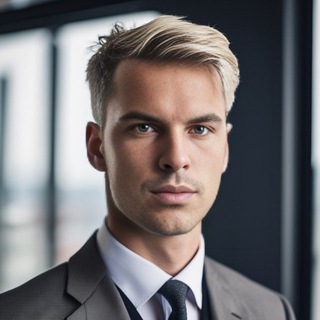
The resume is ready and the experience is laid out, but the photo is a selfie against a carpet. A recruiter glances at a profile for a few seconds, and the picture is the first thing they see. Resume Avatar Bot promises to help you make a decent resume photo with AI. 📸
The bot's description puts it plainly: take a great resume photo. Nearby is a note about using the AI bot for free, plus a separate command for a subscription, so check the terms inside.
How it works
You send the bot your photograph, and a neural network turns it into a tidy business-style portrait. The result can go onto a resume, a social profile or a website.
- /start. Launch and get going.
- /pay. Pay for a subscription.
- /profile. A personal account with details of your access.
- /help. A description of how the chatbot works.
Choosing the source photo
The quality of the output depends heavily on what you upload. The network is no magician: if your face is not visible, the result is a guess and not you.
- Pick a shot in daylight with no shadows on the face.
- Look straight at the camera, head level.
- Remove glare-prone glasses, caps and dark filters.
- Keep the frame sharp and put a light smile on.
- A couple of photos from different angles beat a single one.
An honest word about resume photos
The portrait has to look like you today. If people at the interview do not recognize you from the picture, the effect backfires. Do not smooth out age, features and character beyond what common sense allows.
In some countries and forms a photo is not accepted at all or is advised against, to rule out bias. Check the employer's requirements. 🧾
Privacy: what to know
By uploading your face to any AI service you hand over biometric data. Before paying, find out how long the service keeps photos, who receives them and whether they can be deleted on request.
- Do not upload other people's pictures. Without consent it violates their rights.
- Do not send documents. A photo with a passport or an access pass is not needed.
- Read the terms. Free access and a paid subscription may differ in limits.
Where else a portrait helps
A tidy photo is useful beyond the resume. It fits a professional network profile, a company page, a presentation and emails. The same picture everywhere helps people recognize you.
Refresh the portrait every two or three years or after a visible change in your appearance. 🙂
When to skip the bot
For an important position, a photographer's shot is better. Professional lighting, posing and retouching give the result that AI only approximates. For a quick profile refresh the bot helps, for the main picture of your career a live session is better. 🎯
Finally, check the result on several screens: phone, laptop and shrunk to thumbnail size. A good photo reads even in a small icon.
Perguntas frequentes
What does Resume Avatar Bot do?▼
Is it free?▼
Which photo should I upload for a better result?▼
Is it safe to upload my face?▼
Com base em dados de afiliados